 ...and join the party.
If you’ve made it this far, you already have three items or “things” completed of the twenty three. There's more fun ahead!
Part of the fun is sharing your thoughts with your co-workers. And seeing what they think too. You do that on our particpant's list. E-mail your blog address to SPPL_Learning@ci.stpaul.mn.us.
Remember: your blog address is: http://(xxxx).blogspot.com
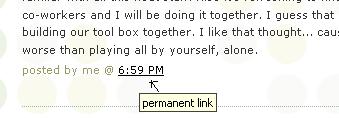
Starting with Thing #5, you also need to include on your record sheet the URL for the permanent link to each of your blog posts. The permanent link will always go to a specific blog post, no matter how big your blog gets. The best way to find the permanent link is in the post's footer area the contains the date.
Example: Here is where you would find the permanent link for this sample blog post:

So, here’s to Thing #4 – why not record your first 4 items on your record sheet. It’s really that easy and just think, now there’s only 19 more things to go. :)
Coming up next: photos, pictures and fun!


2 comments:
The paragraph beginning "Starting with Thing #5, you also need to include on your record sheet the URL..." gave me some problems. First I couldn't find a link to the record sheet. I looked and looked and then accidentally stumbled across the link on the Intranet under Learning 2.0, track your progress. Then I couldn't save the record sheet to my folder even though I followed the directions. After staring at the screen for several minutes and thinking "THIS SHOULD NOT BE THIS HARD!!!" I noticed the little Microsoft Word icon at the beginning of the toolbar below the address bar (next to the printer icon). I clicked on it and was finally able to save the Record Sheet to my folder. I hope everyone else has had better luck with their record sheets!
Couldn't you just save it from the e-mail that was sent to us? It was attached to that.
Post a Comment