 You’ve heard of RSS? You’ve seen those small funny tags on websites? You’ve heard co-workers and acquaintances swear by it, but still have no idea what RSS is?
Well don’t worry, according to a recent survey you are still in the majority, but this is changing rapidly. In the information world, RSS is not only revolutionizing the way news, media and content creators share information, but it also is swiftly changing the way everyday users are consuming information.
RSS stands for “Really Simple Syndication” and is a file format for delivering regularly updated information over the web.
Just think about the websites and news information sources you visit every day. It takes time to visit those sites and scour the ad-filled and image-heavy pages for just the text you want to read.
Now imagine if you could visit all those information sources and web pages in just one place and all at the same time,
- without being bombarded with advertising,
- without having to search for new information on the page you’d already seen or read before,
- and without having to consume a lot of time visiting each site individually.
This week’s discovery exercises focus on learning about RSS news feeds and setting up a Bloglines account (a free online newsreader) for yourself to bring your feeds together.
Discovery Resources:
Learning About RSS Feeds
- RSS in Plain English - A short video about RSS and why you might want to use it.
- CNET Video: RSS – Feel the Need for Feeds (3:32) – a good overview of what RSS is and the benefits to users.
- Feed Me: A gentle introduction to Internet feeds - a good tutorial from Palinet, a library cooperative.
- Using Bloglines Tutorial (how to keep up with dozens of blogs everyday) – This online tutorial walks you through how to setup a Bloglines account and add newsfeeds.
Follow Steps 1 to 3 to set up your Bloglines account.
Steps 4 – 9 are optional and cover how to subscribe to different types of feeds (podcasts, Flickr albums, etc.). - Adding RSS Feeds to Bloglines - A short YouTube video showing how to add feeds.
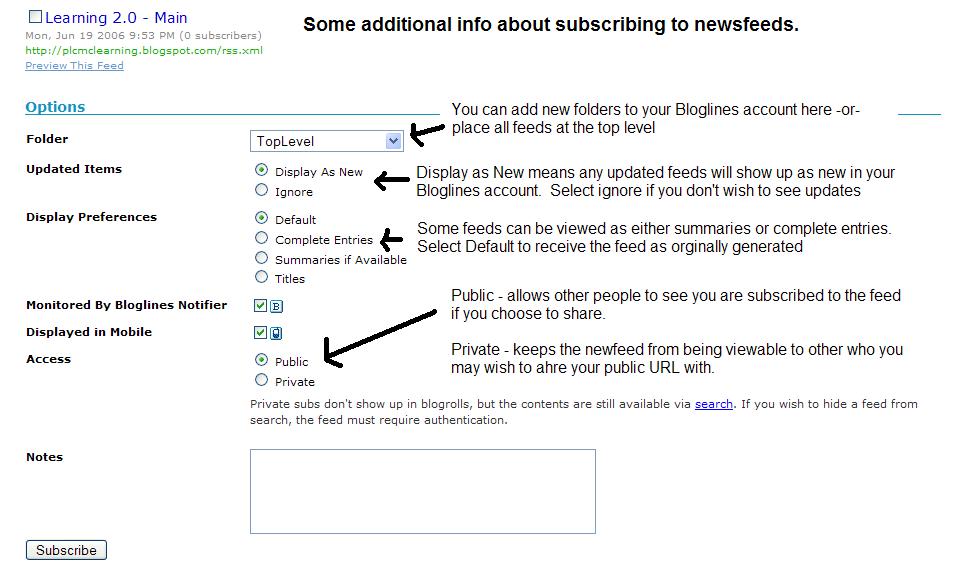
- Additional Bloglines news feed subscription information (screenshot image)
- Your co-workers - tap into their knowledge or work through your discovery process together.
1. Follow the discovery resources above to learn more about RSS and newsreaders.
2. Create a free online Bloglines account for yourself and subscribe to at least 10 newsfeeds to your reader. See steps 1-3 of the Using Bloglines Tutorial for instructions.
(Feel free to use an alternative to Bloglines, such as Google Reader, if you prefer. Keep in mind that instructions here are geared for Bloglines.)
Newsfeeds:
Try adding a few news feeds:
- Twincities.com news feeds
- StarTribune.com news feeds
- New York Times RSS feeds
- Library Journal RSS feeds
3. Create a post in your blog about this exercise.
Don’t know what to blog about? Think about these questions:
- What do you like about RSS and newsreaders?
- How do you think you might be able to use this technology in your work or personal life?
- How can libraries use RSS or take advantage of this new technology?
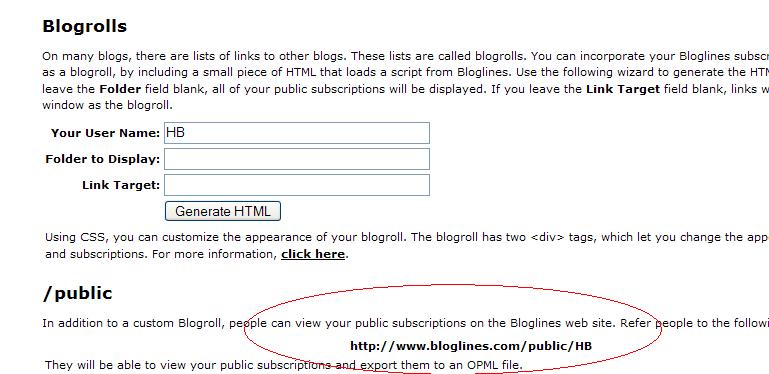
How to find your public Bloglines URL:
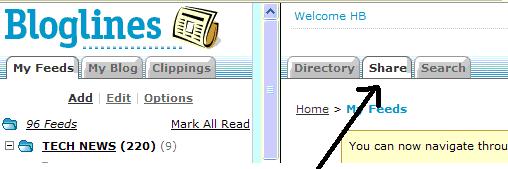
- Click on the Share tab within your Bloglines account:
- Scroll down the right screen pane and locate the public URL (see screenshot)
- Add your public URL to your blog post for this activity.
PS: Once you tackle this discovery exercise, you've completed the most difficult one of the 23. :-)
Coming up next: Finding RSS Feeds!


No comments:
Post a Comment